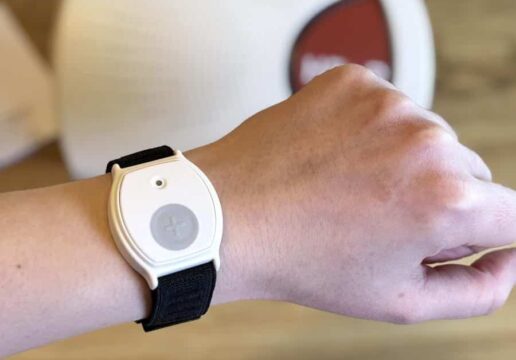
Image courtesy of lifeassure.com
A medical alert system can mean the difference between a quick recovery and a long wait for help. For families on a budget, though, the price tags can look intimidating at first glance.
Seniors and their families do not need to overpay for peace of mind. With a little research, affordable medical alert options deliver the same core protection as the pricier ones. Here is how to choose well without overspending.
Why do medical alert costs vary so much?
Because the price reflects features, contracts, and add-ons, not just the device itself. Two systems that look identical can differ by hundreds of dollars a year.
Monitoring is the biggest variable. A basic in-home unit costs far less than a GPS model with 24/7 monitoring, fall detection, and a mobile connection. Each extra feature raises the monthly fee, so the right plan depends on how and where the device will be used.
Contracts matter just as much. Some providers add activation charges, equipment fees, or long lock-in terms, while others keep the monthly cost simple and flexible. Reading the fine print is where families save the most.
So the headline price is rarely the real one. Atlanta families who already chase local discounts can apply that same eye for value, totaling the full yearly cost before comparing one option to another.
What features are worth paying for?
The ones that match the wearer’s daily life, not every bell and whistle. A few features earn their cost for most seniors:
- Fall detection. Calls for help automatically after a hard fall.
- Two-way voice. Lets the wearer speak to a responder directly.
- GPS location. Useful for anyone who leaves the house often.
- Water resistance. Covers the bathroom, where many falls happen.
- 24/7 monitoring. A real person answers any time, day or night.
Each feature solves a specific risk, so paying for one the wearer will never use just inflates the bill. The goal is protection that fits the person.
Match the device to the routine. A homebound parent may do well with a simple in-home unit, while a senior who still gets out to free local events benefits from GPS that works anywhere.
How can I avoid hidden fees?
By asking about every charge before you sign anything. The advertised monthly rate is only part of the real picture.
Start with the extras. Activation fees, equipment deposits, cancellation penalties, and shipping can add up fast, so ask for the all-in annual cost in writing. Honest providers share it without hesitation.
Watch the contract length too. Month-to-month plans cost a little more but let you change course, which matters when a parent’s needs shift over time. No-fee, no-contract systems exist and suit budget-minded families well.
A little homework here pays off directly. Free guidance from trusted senior resources can also help families compare honestly and spot which features are genuinely worth paying for. A quick phone call to a provider with a list of questions often reveals more than any glossy brochure.
What should I compare before buying?
The full cost and the fit, side by side. A quick comparison stops an impulse purchase. The numbers below set realistic expectations:
- Basic in-home units start around $20 a month.
- GPS mobile plans run roughly $40 a month.
- Fall detection adds about $10 monthly.
- Avoid contracts longer than 1 year where you can.
- Add at least 1 backup contact to the account.
Those figures frame a sensible budget. The table below shows what to weigh.
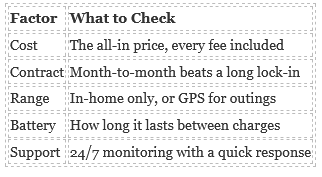
Image courtesy of lifeassure.com
Each row keeps the focus on value, not just the lowest sticker price. Staying safe at home also means preventing falls at home with good lighting and clear floors, which costs nothing at all.
What to weigh before you buy
- The cheapest plan is not always the best value.
- Pay only for features the wearer will actually use.
- Ask for the all-in annual cost, fees included.
- Favor month-to-month plans over long contracts.
- Pair the right device with simple home safety steps.
Safety that fits your budget
A medical alert system is one of the smartest, most affordable investments a family can make in a parent’s independence. Focus on the features that match daily life, read the contract closely, and total every fee before you commit. Do that, and you protect both your loved one and your wallet. Peace of mind, it turns out, does not have to be expensive.
Frequently Asked Questions
How Much Does a Medical Alert System Cost?
Prices typically range from about $20 a month for a basic in-home unit to $40 or more for a GPS mobile system. Add-ons like fall detection raise the cost slightly. Watch for activation and equipment fees, and always compare the full annual price rather than the headline monthly rate. Many families find the mid-range plan offers the best balance of cost and coverage.
Are There Medical Alert Systems With No Monthly Fee?
Some providers offer no-contract or no-fee options that lower the long-term cost. These can suit budget-conscious families well, though you should confirm exactly what is included. Read the terms carefully so a low advertised price does not hide setup or cancellation charges later on.
Is Fall Detection Worth the Extra Cost?
For many seniors, yes. Fall detection calls for help automatically when the wearer cannot press the button, which is valuable for anyone with balance or mobility concerns. It usually adds about $10 a month, a small price for an added layer of protection at home.
What Is the Best Medical Alert System for Seniors On a Budget?
The best choice is the one that matches the wearer’s daily needs at a fair, transparent price. Look for clear pricing, no long contract, and only the features that fit their routine. A simple in-home unit often serves a homebound senior perfectly without any extra spending.